


I’ve spent the last several years helping companies untangle their internal processes, and I’ll tell you something that took me far too long to figure out on my own.
Most businesses don’t actually have a productivity problem. They have a workflow problem.
The difference matters. A productivity problem suggests people need to work harder or faster. A workflow problem means your people are already working hard, but they’re drowning in repetitive tasks, manual approvals, and disconnected systems that should have been automated years ago.
That’s where enterprise workflow automation changes everything.
In this Tech Specs guide, I’m going to walk you through the most impactful real-world business scenarios where automation delivers measurable results. Not theoretical fluff. Not vendor marketing speak. Just genuine use cases I’ve either implemented, witnessed firsthand, or studied in depth across multiple industries.
Let’s get into it.
What Enterprise Workflow Automation Really Means
Before we dive into the use cases, let’s clear something up.
Enterprise workflow automation is the practice of using software to handle repetitive, rules-based business processes that traditionally required human intervention. We’re talking about approvals, data entry, document routing, notifications, system updates, and the hundreds of tiny tasks that consume your team’s day.
Here’s what makes it “enterprise” rather than just regular automation:
- It operates across departments and systems
- It handles complex, multi-step processes with conditional logic
- It integrates with your existing tech stack (ERP, CRM, HRIS, etc.)
- It scales to handle thousands of transactions without breaking
- It includes governance, audit trails, and compliance features
Now, here’s the honest truth most consultants won’t tell you: automation isn’t magic. It works brilliantly when applied to the right processes, and it creates expensive disasters when applied to broken ones. The use cases below have proven themselves repeatedly because they target genuinely repetitive, rule-based work.
Why Businesses Are Racing Toward Workflow Automation
The shift toward enterprise workflow automation isn’t hype. It’s economics.
Companies implementing thoughtful automation strategies typically see:
- 40 to 75 percent reduction in process completion time
- 60 to 90 percent fewer errors in data-heavy workflows
- Significant labor cost savings, often paying back implementation within 12 to 18 months
- Higher employee satisfaction because people stop doing soul-crushing repetitive tasks
- Better compliance through consistent, auditable processes
But the real reason companies invest in workflow solutions has shifted recently. It’s no longer just about cutting costs. It’s about scaling without proportionally scaling headcount, responding faster to market changes, and freeing skilled employees to do work that actually requires their skills.
Let me show you exactly how this plays out across different business scenarios.
Use Case 1:
Employee Onboarding and HR Workflows
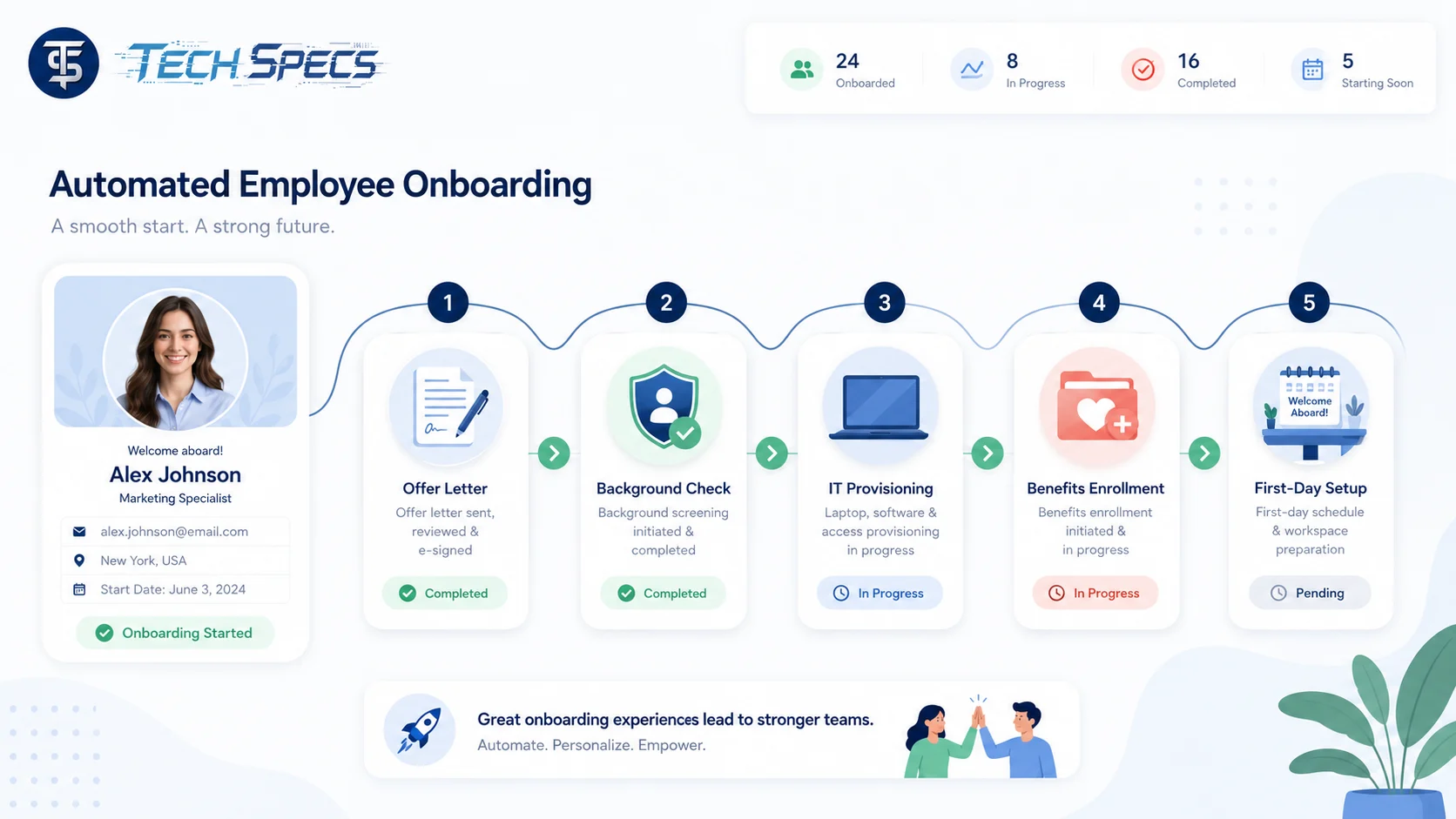
Onboarding might be the single most painful manual process in most companies. A new hire generates work across IT, HR, facilities, finance, and the hiring manager’s team, and somehow it all needs to coordinate.
Here’s what enterprise workflow automation handles in a typical onboarding scenario:
- Offer letter generation and e-signature routing
- Background check initiation and tracking
- IT equipment provisioning requests
- Software license assignments based on role
- Access permissions across systems
- Benefits enrollment workflows
- First-day schedule creation and stakeholder notifications
- Training course assignments
- Tax form collection and submission
A mid-sized company I’m familiar with reduced their onboarding setup time from 11 days to under 48 hours by automating these handoffs. The new hire received their laptop, credentials, system access, and benefits enrollment links before their first day, and managers stopped chasing IT tickets.
The same principles apply to offboarding, role changes, promotions, and internal transfers. These are some of the highest-ROI automation examples because they happen frequently and touch multiple departments.
Use Case 2:
Invoice Processing and Accounts Payable
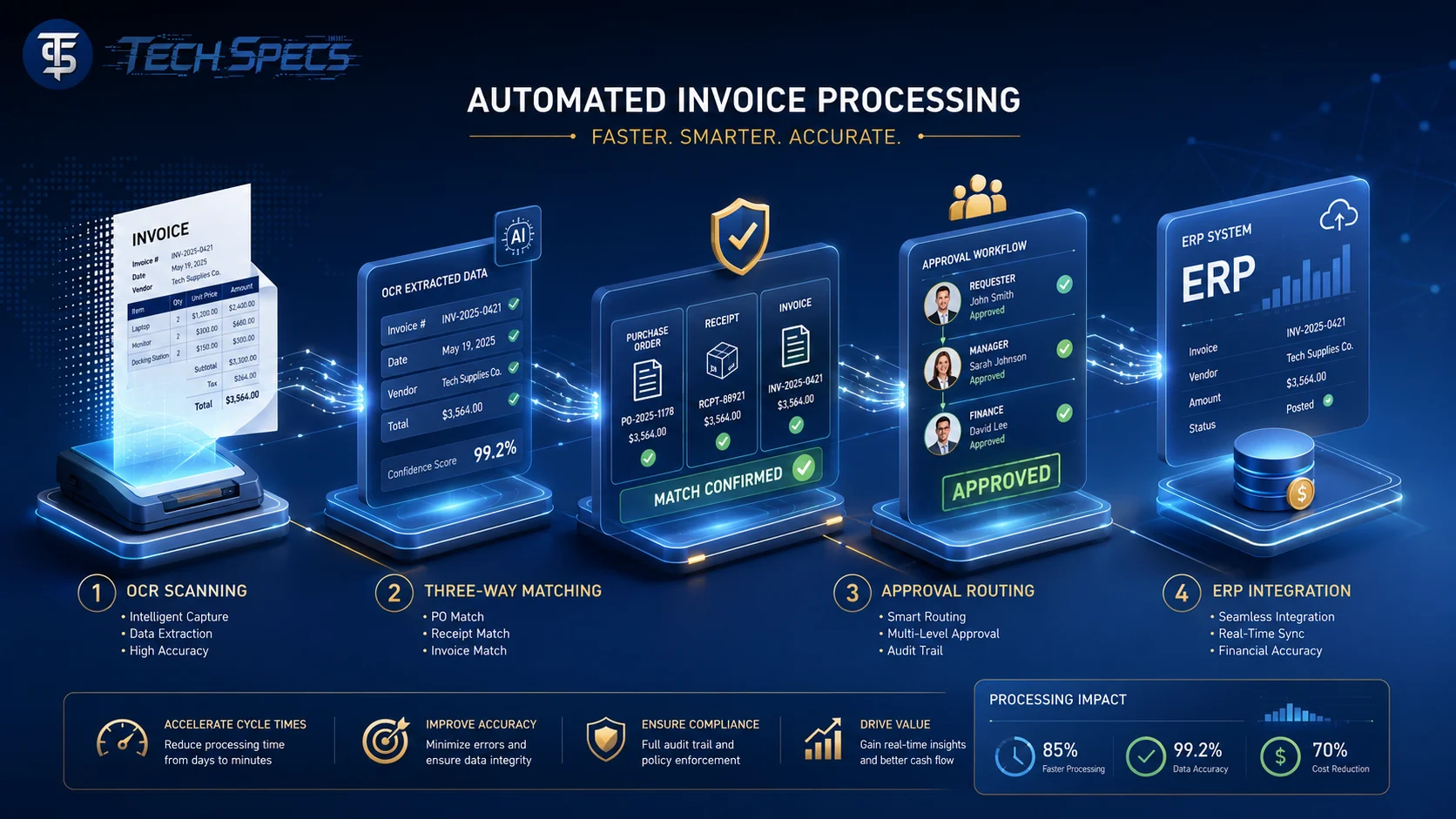
If you want a clear, undeniable win for enterprise workflow automation, look at your accounts payable department.
Manual invoice processing is brutal. Someone receives an invoice (often by email, sometimes by physical mail), manually enters the data, matches it against purchase orders, routes it for approval, follows up when approvers don’t respond, and finally enters it into the accounting system.
Automated AP workflows transform this completely:
- Invoice capture through OCR and AI extraction
- Three-way matching between PO, receipt, and invoice
- Automatic routing based on amount, vendor, or department
- Approval escalations when deadlines approach
- Duplicate detection to catch fraud or errors
- ERP integration for seamless posting
- Payment scheduling based on terms and cash flow
Companies using automated AP workflows typically process invoices for under $3 each, compared to $15 to $40 per invoice for manual processing. For a business handling 10,000 invoices monthly, that math gets very compelling, very quickly.
Use Case 3:
Customer Onboarding and Account Setup
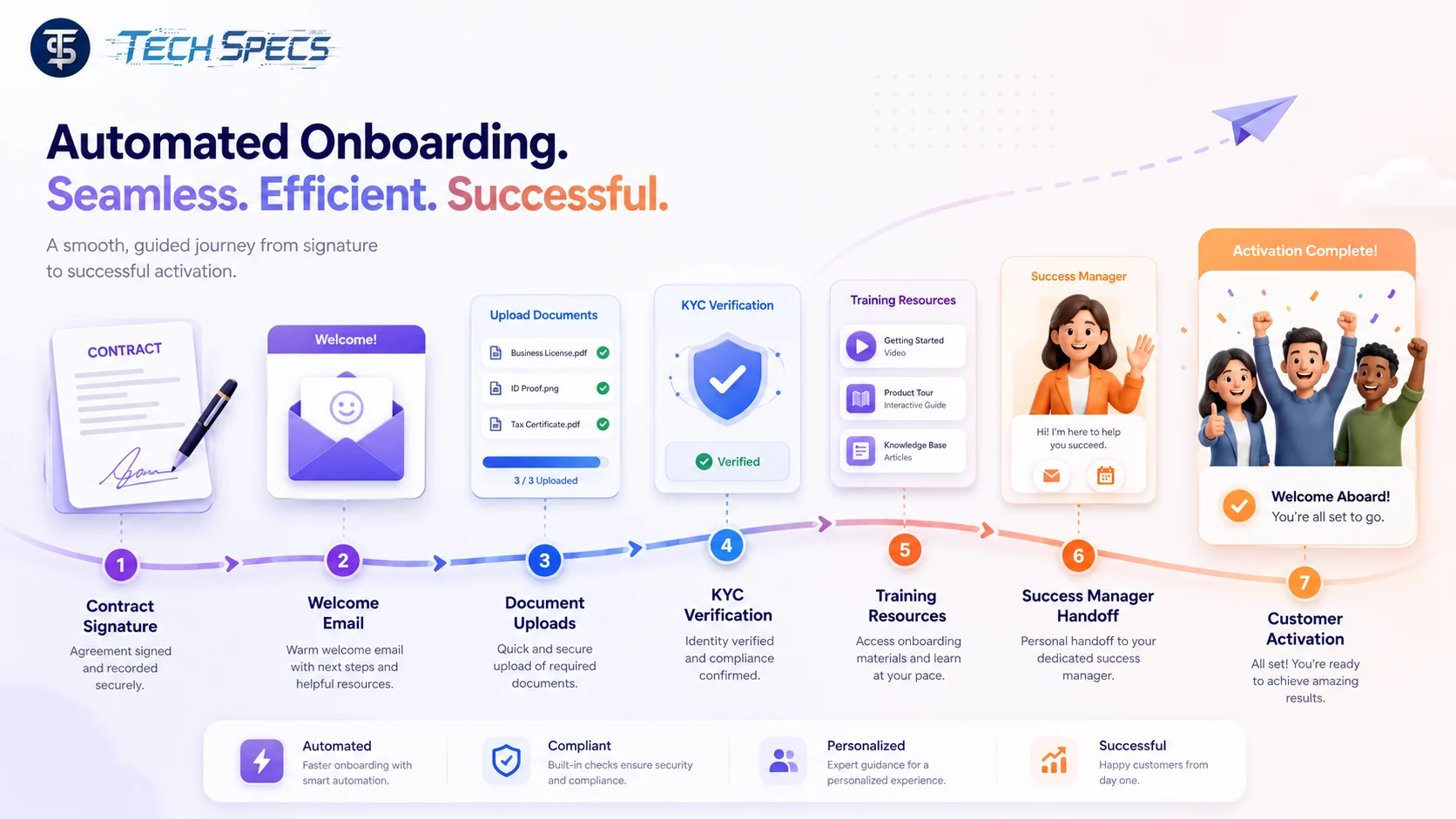
Customer onboarding is often the first real experience your customer has with your operations. If it feels clunky, slow, or disconnected, you’ve set the tone for the entire relationship.
Enterprise workflow automation transforms customer onboarding through:
- Automated welcome sequences triggered by contract signature
- Account provisioning across multiple systems simultaneously
- Document collection workflows with automatic reminders
- KYC and compliance verification for regulated industries
- Implementation milestone tracking with stakeholder notifications
- Training and resource delivery based on customer profile
- Success manager handoff with full context included
I’ve watched financial services firms cut customer onboarding from 21 days to 3 days using these workflow solutions. In SaaS companies, the impact often shows up in faster time-to-value and significantly higher activation rates.
Use Case 4:
Procurement and Purchase Order Workflows
Procurement is one of those processes where the manual version creates real business risk. Without proper workflows, you get:
- Maverick spending outside of approved vendors
- Duplicate orders across departments
- Missing approvals that surface during audits
- Delayed orders that affect operations
- Compliance gaps in regulated industries
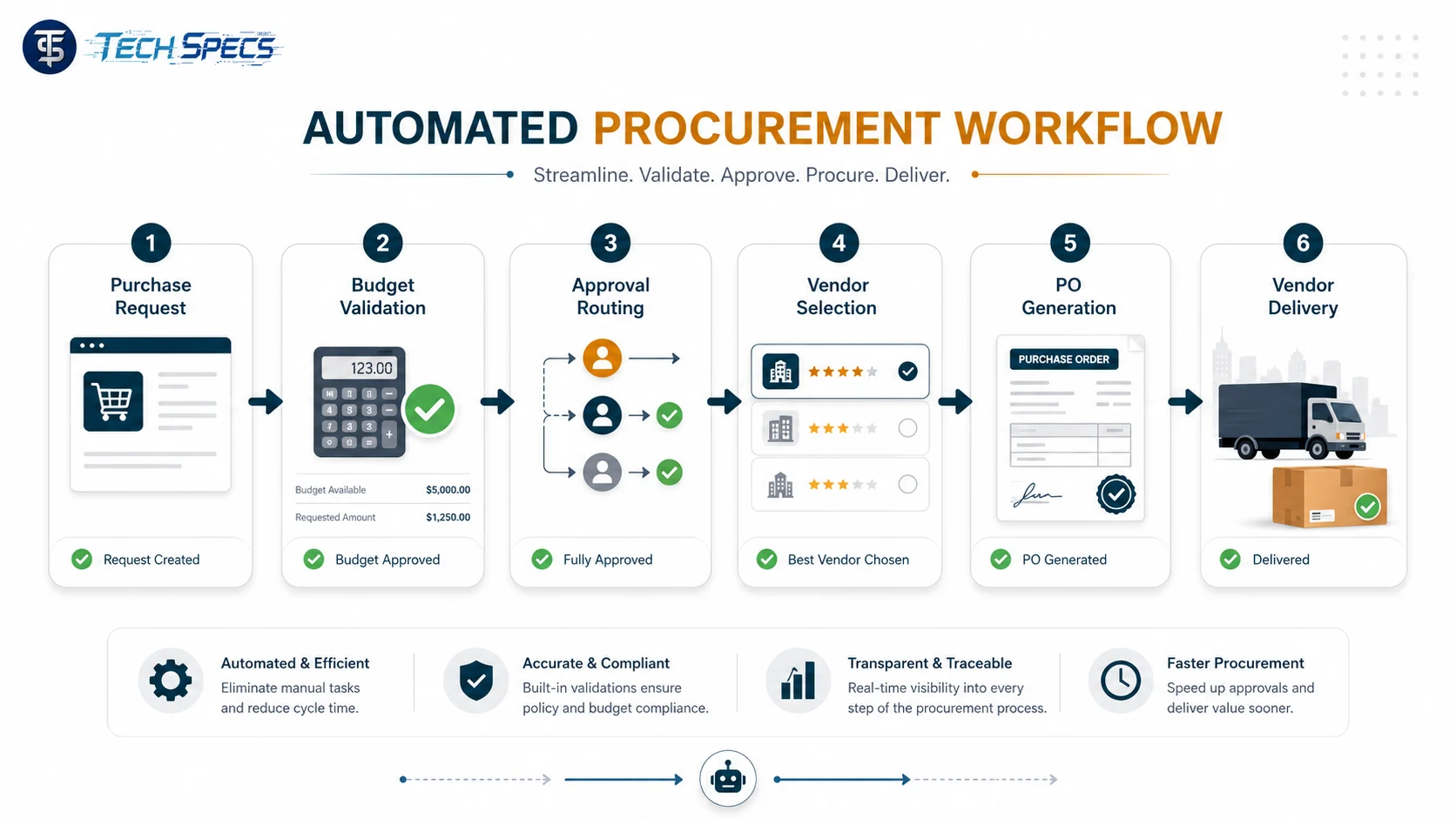
Automated procurement workflows address each of these problems:
Request initiation: Employees submit purchase requests through standardized forms with required fields validated automatically.
Budget validation: The system checks available budget in real-time before allowing the request to proceed.
Approval routing: Requests route based on amount, category, department, and other rules, with automatic escalation if approvers are unavailable.
Vendor management: The workflow validates preferred vendor status, checks contract terms, and flags any compliance issues.
Purchase order generation: Once approved, the system generates and sends the PO automatically.
Receipt tracking: Goods receipt triggers the matching process for AP automation.
This is one of the strongest industry use cases because procurement touches nearly every department and the rules are well-defined.
Use Case 5:
IT Service Management and Helpdesk Workflows
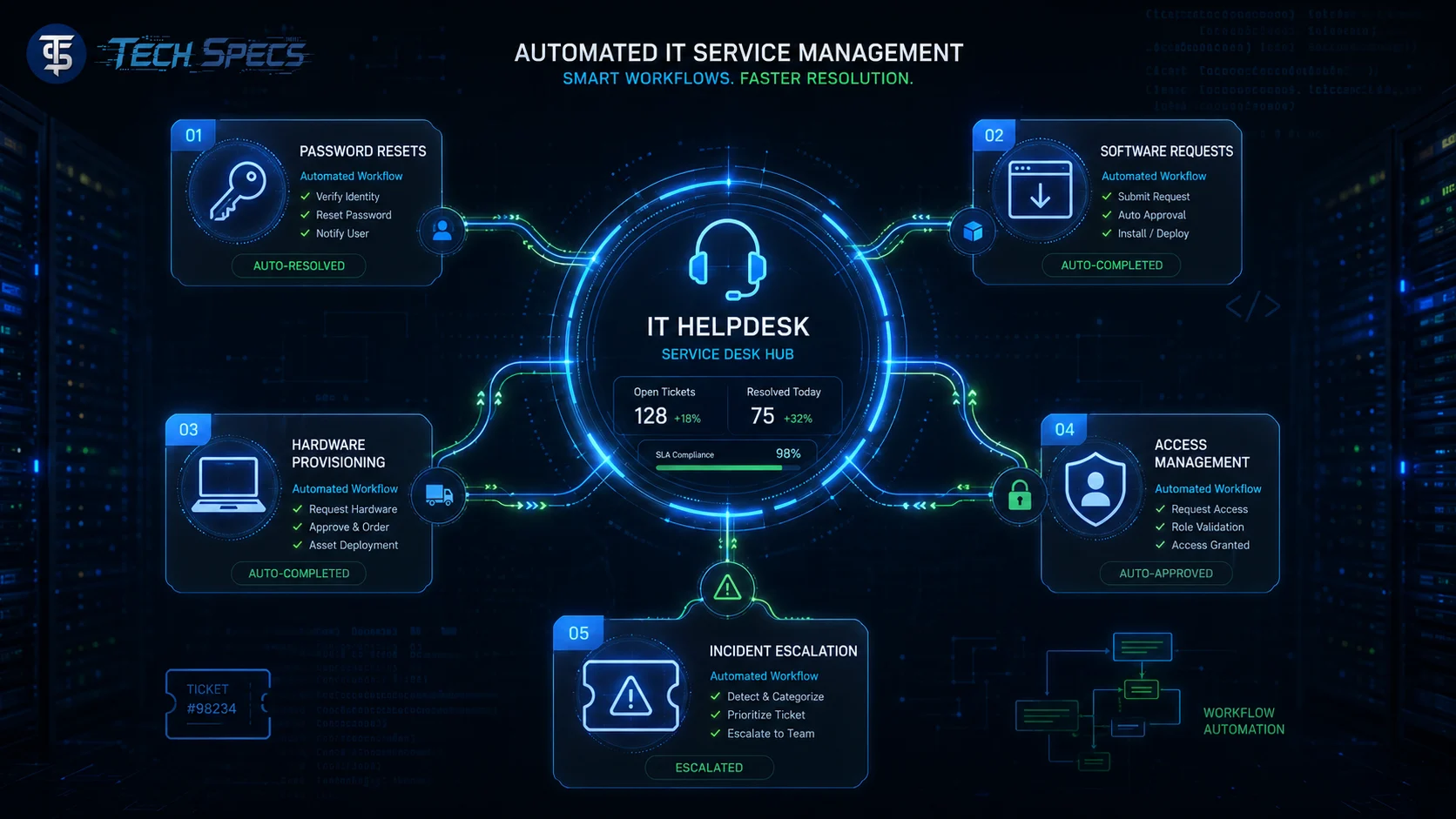
IT departments were among the earliest adopters of workflow automation, and for good reason. IT tickets follow predictable patterns, requests fall into clear categories, and most resolutions involve repeating the same steps countless times.
Common IT automation scenarios include:
- Password reset automation with self-service options
- Software request workflows with automatic provisioning
- Hardware refresh cycles with scheduled replacements
- Access request approvals with role-based logic
- Incident escalation based on severity and SLA
- Change management workflows with proper approvals
- Asset lifecycle tracking from procurement to retirement
A pattern I’ve noticed in successful IT automation: the goal isn’t to remove humans from IT support. It’s to remove humans from the boring 80 percent of requests so they can focus on the genuinely complex 20 percent.
Use Case 6:
Compliance and Audit Trail Management
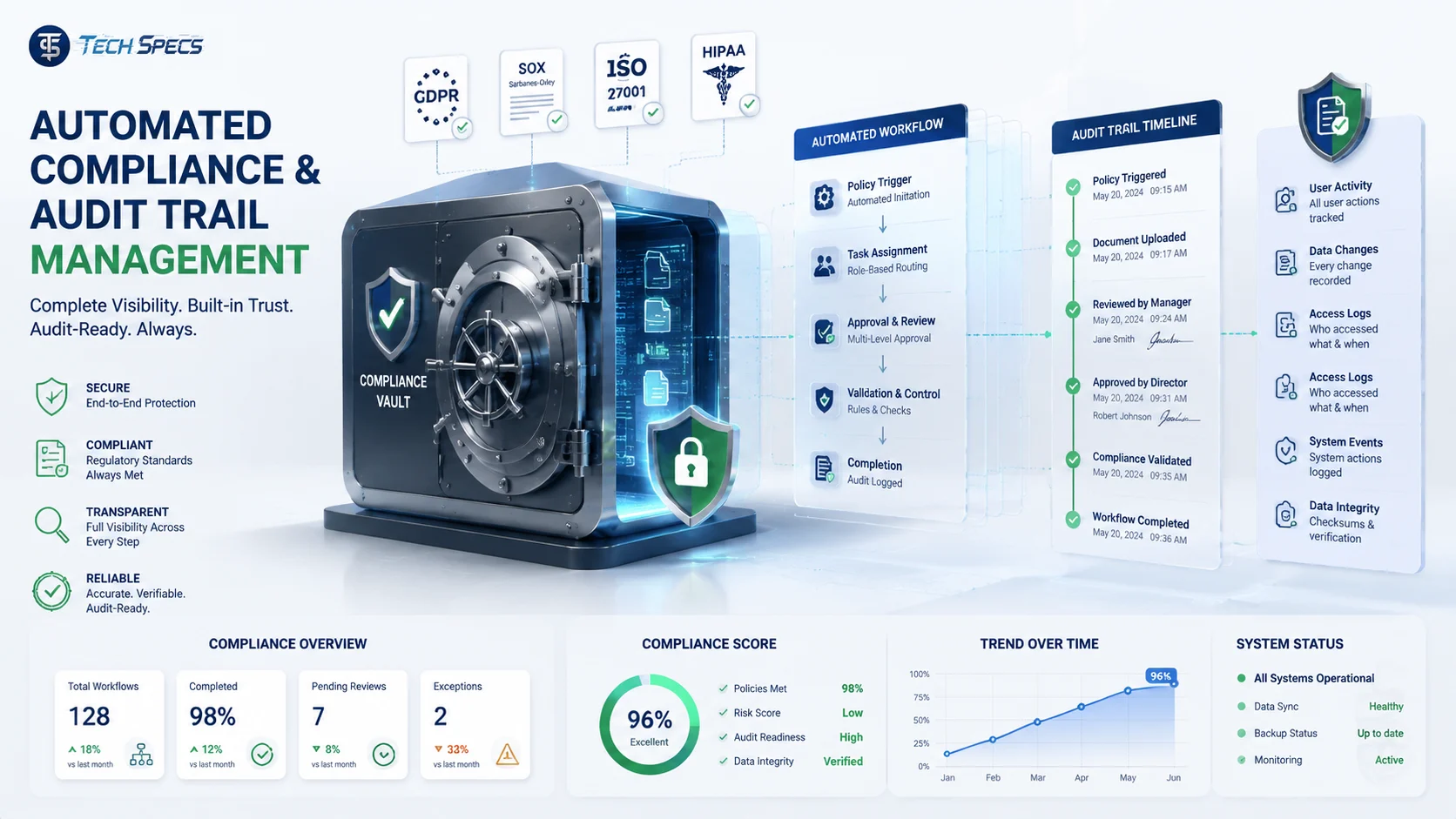
Regulated industries face a particular challenge with workflow automation. Every process needs documentation, every decision needs justification, and every change needs an audit trail.
The good news is that automated workflows are inherently better at compliance than manual ones. Every action gets timestamped, every approver is recorded, every document version is preserved, and every exception is flagged.
Specific compliance scenarios where automation excels:
- GDPR data subject requests with automated discovery and response
- SOX compliance workflows for financial controls
- HIPAA-compliant patient data handling
- Regulatory reporting with automated data collection and validation
- Policy attestation campaigns with tracking and escalation
- Vendor risk assessments with periodic reviews
- Anti-money laundering checks in financial services
The interesting twist is that companies often discover their compliance posture improves dramatically after automation, not just their efficiency. Manual processes leave gaps. Automated processes don’t forget steps.
Use Case 7:
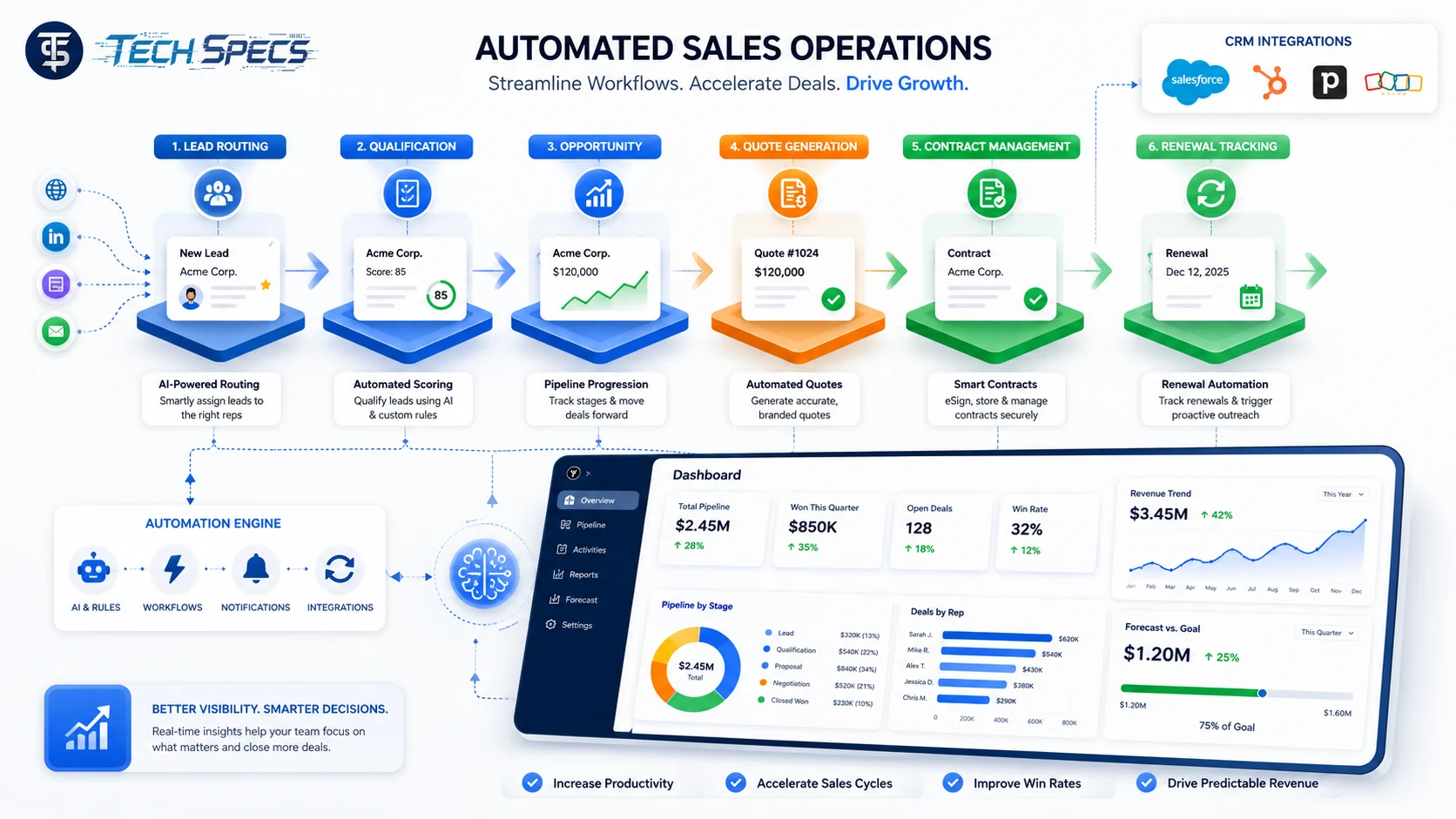
Sales Operations and CRM Workflows
Sales teams generate enormous administrative overhead, and most sales leaders dramatically underestimate how much time reps spend on non-selling activities.
Enterprise workflow automation transforms sales operations through scenarios like:
Lead routing: New leads automatically assigned based on territory, industry, deal size, or rep capacity.
Opportunity stage progression: When deals advance, the system triggers appropriate next steps, notifications, and resource assignments.
Quote and proposal generation: Templates populate automatically with deal-specific information, route for approval based on discount levels, and convert to contracts upon acceptance.
Contract management: Redlining workflows, legal review routing, e-signature collection, and final filing all happen through coordinated automation.
Renewal management: The system tracks renewal dates, generates notifications, prepares proposals, and routes everything to account managers in advance.
Commission calculations: Automated workflows pull data from the CRM, apply commission rules, route for approval, and integrate with payroll.
Sales reps who get freed from administrative work typically increase their selling time by 25 to 40 percent. That’s not a productivity improvement, that’s a revenue multiplier.
Use Case 8:
Customer Support and Case Management
Customer support workflows benefit enormously from intelligent automation, particularly as customer volumes grow.
The most valuable workflow solutions in support include:
- Ticket classification and routing based on content and customer
- Priority assignment using SLA rules and customer tier
- Automated responses for common questions with smooth escalation paths
- Internal knowledge base suggestions for agents
- Quality assurance sampling with automatic case selection
- Customer satisfaction surveys are triggered after resolution
- Trending issue detection through automated analysis
The key principle here is augmentation, not replacement. The best support automation makes human agents dramatically more effective at handling the cases that genuinely require human judgment.
Use Case 9:
Marketing Automation and Campaign Management
Marketing operations involves coordinating campaigns across channels, audiences, and stakeholders. Without automation, this becomes impossibly complex at scale.
Real-world applications in marketing include:
- Lead nurture sequences based on behavior and engagement
- Content approval workflows routing through legal, brand, and stakeholders
- Campaign launch coordination across multiple platforms
- A/B test management with automatic winner selection
- Attribution reporting with automated data aggregation
- Event registration and follow-up workflows
- Account-based marketing orchestration across accounts
Marketing teams that implement strong workflow automation can run dramatically more campaigns with the same headcount, while improving consistency and reducing errors.
Use Case 10:
Financial Close and Reporting Workflows
Month-end and quarter-end closes are notoriously stressful in most finance organizations. Spreadsheets fly around, deadlines slip, and senior accountants work late nights chasing reconciliations.
Automated close workflows address this through:
- Task list coordination with dependencies and ownership
- Reconciliation automation for high-volume accounts
- Journal entry approvals with proper segregation of duties
- Variance analysis with automated investigation triggers
- Management reporting with automated data collection
- Audit support through complete, accessible documentation
Companies implementing finance workflow automation typically reduce close times by 30 to 50 percent while improving accuracy and reducing overtime.
Use Case 11:
Contract Lifecycle Management
Contracts touch nearly every part of a business, yet contract management remains shockingly manual in most organizations. Documents get lost, deadlines get missed, renewal opportunities slip away, and risk piles up unnoticed.
Workflow solutions for contracts handling:
- Request intake through standardized forms
- Template selection based on contract type and parameters
- Redlining and negotiation tracking
- Approval routing based on terms, value, and risk
- E-signature collection and distribution
- Obligation tracking post-signature
- Renewal alerts with sufficient lead time
- Expiration management to avoid auto-renewals you don’t want
This is one of those business scenarios where the financial impact often exceeds the efficiency gain. Catching one bad auto-renewal can pay for the entire automation platform.
Use Case 12:
Supply Chain and Logistics Workflows
Supply chain operations involve constant coordination across suppliers, transportation, warehouses, and customers. Manual coordination breaks down at scale, especially when exceptions occur.
Automation transforms supply chain through scenarios like:
- Demand forecasting workflows with automated replenishment
- Supplier onboarding and qualification
- Shipment tracking with proactive customer notifications
- Exception management when shipments are delayed
- Returns processing with automated authorizations
- Inventory adjustments with proper approvals and documentation
- Vendor performance monitoring with automated scorecards
In industries with thin margins, supply chain automation often delivers the highest absolute dollar impact of any workflow initiative.
How to Choose Which Workflows to Automate First
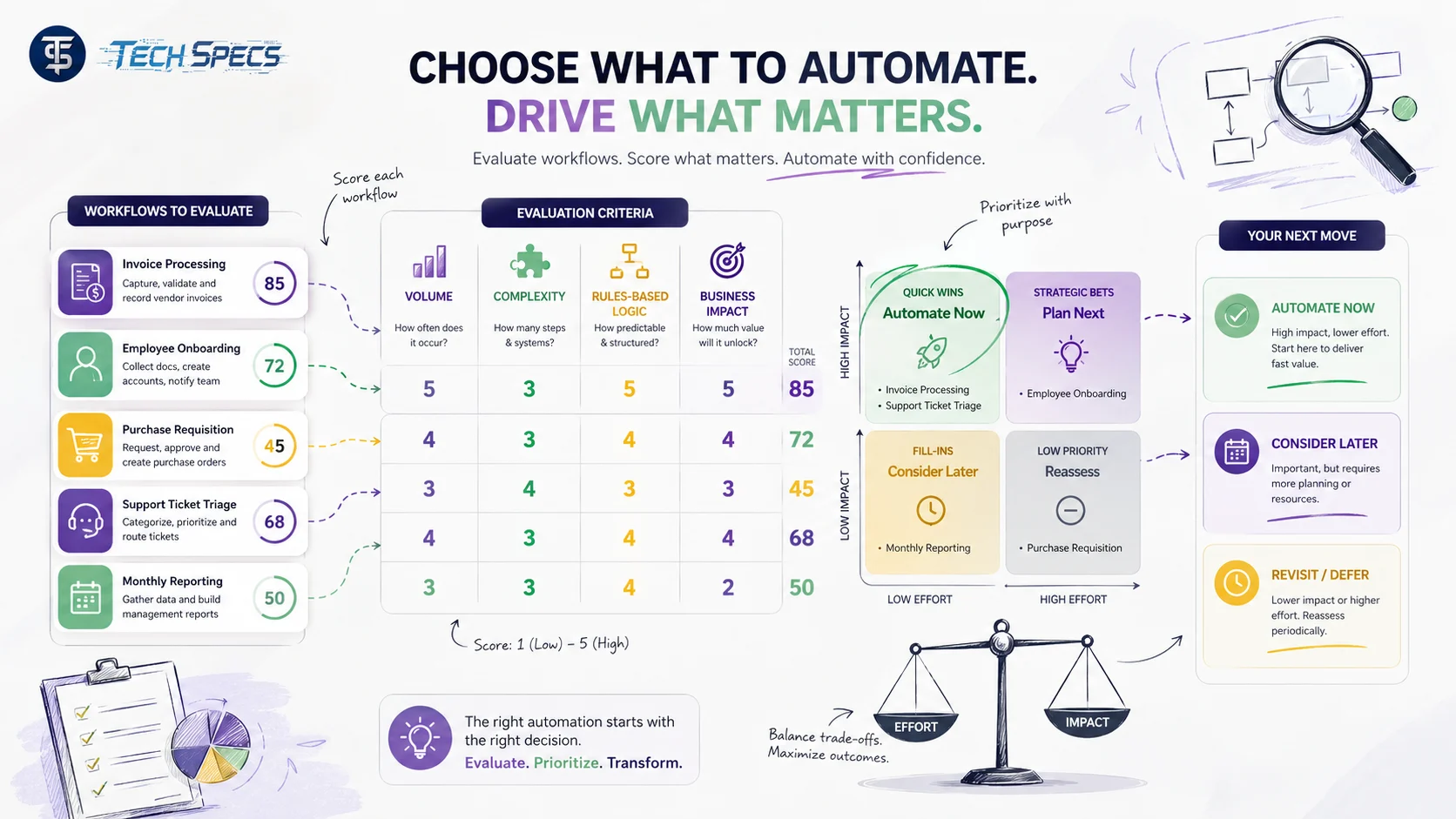
After seeing dozens of automation initiatives succeed and fail, I’ve developed strong opinions about prioritization.
Start with processes that are:
- High volume: The more often a process runs, the bigger the return on automation investment.
- Rule-based: Clear, deterministic logic automates well. Subjective judgment doesn’t.
- Cross-functional: Workflows that span departments deliver outsized value through better coordination.
- Error-prone manually: Processes where humans frequently make mistakes are perfect for automation.
- Audit-relevant: Regulated processes benefit from the consistency automation provides.
Avoid starting with:
- Broken processes you haven’t fixed (you’ll just automate the dysfunction)
- Processes that genuinely require human judgment
- One-off or rarely-run processes
- Highly political processes where automation will face resistance
The smartest companies start with one well-chosen workflow, demonstrate results, then expand methodically. They don’t try to automate everything at once.
Common Pitfalls in Enterprise Workflow Automation
I’ve watched plenty of automation initiatives stumble, and the patterns are surprisingly consistent.
Automating broken processes: If your current process is dysfunctional, automation makes the dysfunction faster, not better. Fix the process first, then automate it.
Ignoring change management: Workflow automation changes how people work. If you don’t bring them along thoughtfully, you’ll get resistance, workarounds, and shadow processes.
Underestimating integration complexity: The actual workflow logic is usually the easy part. Connecting to your existing systems is where projects often stall.
Choosing technology before understanding requirements: Buying an automation platform before mapping your processes is like buying lumber before deciding what to build.
Skipping governance: Without proper governance, automation initiatives proliferate, conflict, and create technical debt. Establish standards early.
Measuring the wrong things: Track business outcomes, not just process metrics. Faster invoice processing is nice, but improved cash flow is what executives care about.
The Future of Enterprise Workflow Automation

The space is evolving quickly, and a few trends are worth watching:
Intelligent automation: Traditional workflow tools handled deterministic processes. New platforms incorporate AI to handle unstructured data, make decisions based on patterns, and adapt to changing conditions.
Citizen development: Low-code and no-code platforms are putting workflow automation tools in the hands of business users, not just IT. This dramatically accelerates adoption but requires good governance.
Process mining: Before automating, companies are using process mining tools to understand how work actually flows, including all the deviations and exceptions that surface only when you look at real data.
Hyperautomation: This term gets overused, but the underlying idea matters. Instead of automating individual tasks, companies are connecting workflows end-to-end to automate entire business outcomes.
Companies serious about workflow automation are building centers of excellence, establishing platforms rather than point solutions, and treating automation as a core capability rather than an IT project.
Final Thoughts
Enterprise workflow automation isn’t a trend that’s coming. It’s already here, and the gap between companies that embrace it and those that don’t keeps widening.
The use cases I’ve covered aren’t theoretical possibilities. They’re real business scenarios delivering measurable results across industries right now. Whether you start with accounts payable, employee onboarding, customer support, or any other workflow, the principles remain consistent: target genuinely repetitive work, fix processes before automating them, integrate thoughtfully with existing systems, and bring your people along on the journey.
The companies winning with automation aren’t necessarily the ones with the biggest budgets or fanciest platforms. They’re the ones who picked the right starting points, demonstrated value, and built momentum from there.
Pick one workflow that’s frustrating your team or limiting your growth. Map it out honestly. Identify the rules and exceptions. Then decide whether automation could transform it.
That’s how every successful automation journey begins.
Subscribe now, and you can also find us on Google.
Frequently Asked Questions
What is enterprise workflow automation?
Enterprise workflow automation is the use of software to handle repetitive, rules-based business processes across an organization. It coordinates tasks, integrates systems, manages approvals, and tracks outcomes, all without requiring constant manual intervention.
Which business processes are best suited for enterprise workflow automation?
The strongest candidates are high-volume, rule-based processes that span multiple departments or systems. Common examples include invoice processing, employee onboarding, customer account setup, procurement, IT requests, and compliance workflows.
How long does it take to implement enterprise workflow automation?
Implementation timelines vary significantly. Simple departmental workflows can launch in 4 to 8 weeks. Complex cross-functional automation with multiple system integrations may take 4 to 9 months. Most companies see results faster by starting with focused pilot projects.
What is the typical ROI on workflow automation?
Well-executed automation initiatives typically pay back within 12 to 18 months and deliver ongoing returns of 200 to 400 percent. Returns come from labor savings, error reduction, faster cycle times, and improved compliance.
Do we need to replace our existing systems to implement automation?
Usually not. Modern workflow solutions integrate with existing ERP, CRM, HRIS, and other enterprise systems. The goal is to orchestrate work across your existing technology, not replace it. Integration capabilities should be a major factor in platform selection.
What is the difference between workflow automation and robotic process automation (RPA)?
Workflow automation orchestrates processes across systems and people, managing the overall flow of work. RPA mimics human actions to automate tasks within specific applications. Many modern platforms combine both approaches for comprehensive automation.
How do we ensure our automation initiatives comply with regulations?
Built-in audit trails, role-based access controls, and version control help significantly. Beyond technical features, establish governance processes that include compliance review for new workflows, especially in regulated industries.
What skills does our team need for enterprise workflow automation?
You need a mix of process analysts who understand the business, technical resources who can handle integrations, citizen developers who can build workflows, and a governance function to maintain standards. Most companies build this capability over time.
Can small departments implement workflow automation without IT?
Modern low-code platforms make this increasingly possible. However, even departmental implementations benefit from IT collaboration around integrations, security, and data governance. Pure shadow IT approaches eventually create problems.
How do we measure success in workflow automation initiatives?
Track both process metrics (cycle time, error rates, completion rates) and business outcomes (cost savings, customer satisfaction, employee satisfaction, compliance results). The best metrics tie directly to your organization’s strategic priorities.
What happens to employees whose work gets automated?
Successful organizations redirect employees to higher-value work rather than eliminating positions. This includes process improvement, exception handling, customer relationships, and strategic projects. Transparency about intentions matters enormously for employee buy-in.
Is enterprise workflow automation worth it for mid-sized companies?
Absolutely. Mid-sized companies often see proportionally larger benefits because they have enough volume to justify automation but limited capacity to scale manually. The key is right-sizing the approach to match your complexity and budget.